My iPhone fell in water by accident – how to fix it?
Dropped iPhone in water accidentally?-Here’s how to avoid water damage
‘My iPhone fell in water and how to fix it’, is a query you may often hear from iPhone users. Dropping an iPhone in water, a bucket, a drink like coffee or juice, or even a toilet by accident is not an uncommon occurrence. Accidents can happen with all sorts of liquids, and it’s important to be careful to avoid exposing your device to water or other drinks. However, there is no need to panic in case you accidentally dropped iPhone in water or any other liquid.
When your iPhone dropped in water accidentally, with a little luck, it is often possible to fix iPhone water damage and bring the device back to normal operation by drying it out. If the exposure was only a minor splash, your device may be fine, but you should still take precautions.
Can iPhone withstand brief exposure to water?
Modern iPhone models, including the popular iPhone SE, are built with water and dust resistance in mind. This means your device is designed to withstand accidental splashes, brief exposure to moisture, and everyday dust, helping to protect against common causes of water damage. However, it’s important to remember that water resistance is not the same as being completely waterproof. Each iPhone model has a specific rating that indicates its level of protection. For example, the iPhone 12 series boasts an IP68 rating, allowing it to survive submersion in water up to a maximum depth of 6 meters for up to 30 minutes. Other models may have lower ratings, so it’s crucial to know your device’s capabilities.
What about other phones and waterproof ratings?
It’s not just iPhones—other top smartphones like the Google Pixel 7, Samsung Galaxy Z Fold 4, OnePlus 10 Pro, and Sony Xperia 1 IV also offer impressive water resistance, but the actual level varies by device. The rating system to look for is the “IP” code: for instance, an IP68 rating means the phone can handle being submerged in water (typically up to 1.5 meters for 30 minutes, though some models go deeper). On the other hand, earlier iPhone models and many budget devices may have little to no water protection at all.
So, while many modern phones are designed to survive everyday splashes, rain, or the occasional drop in the sink, none are truly “waterproof.” Always check your specific model’s resistance level and remember: caution around liquids is still your best defense!
iPhone Water Resistance Ratings at a Glance
Not all iPhones are created equal when it comes to keeping water out. Here’s a quick breakdown:
No official water resistance rating:
- Original iPhone through iPhone 6S
- iPhone SE (1st generation)
These older models aren’t designed to handle splashes or spills, so extra caution is needed.
IP67 rating (withstands immersion up to 1 meter for 30 minutes):
- iPhone 7, iPhone 7 Plus
- iPhone 8, iPhone 8 Plus
- iPhone X, iPhone XR
- iPhone SE (2nd and 3rd generation)
A little rain or a quick dunk in the sink? These models can usually handle it, but don’t push your luck.
IP68 rating (increasing depth and time depending on the model):
- iPhone XS, XS Max, and iPhone 11: up to 2 meters for 30 minutes
- iPhone 11 Pro, 11 Pro Max: up to 4 meters for 30 minutes
- iPhone 12/13/14/15/16 series (including mini, Pro, Pro Max, Plus): up to 6 meters for 30 minutes
The latest iPhones can brave deeper water for longer, but even they have their limits.
Which phones are considered waterproof?
If you’re wondering which smartphones can take a splash without worrying too much, many of today’s top models come with impressive water resistance built right in. Besides recent iPhones (like the iPhone 11, iPhone 12, iPhone 13, and iPhone 14 series), you’ll also find water and dust resistance ratings on flagship devices from major brands.
Here’s a quick list of popular phones designed to withstand water:
- Samsung Galaxy Z Fold 4, Galaxy Z Flip 4, and many newer Galaxy S and Note series models
- Google Pixel 7 series and other recent Pixel phones
- Sony Xperia 1 IV and other select Xperia models
- Xiaomi 12S Ultra
- OnePlus 10 Pro and other new premium OnePlus devices
These phones typically meet either IP67 or IP68 standards, meaning they’re built to survive splashes, spills, and brief submersion—though, as with all tech, it’s best not to take them for a swim on purpose. Always double-check your specific model’s resistance rating for peace of mind.
Water and dust resistance can help prevent liquid damage, but it does not guarantee your iPhone will be safe in every situation. Understanding these limitations and the specific resistance level of your iPhone model is essential for keeping your device safe from moisture, dust, and accidental drops into water.
Which iPhone models lack an official water resistance rating?
If you’re wondering whether your older iPhone can shrug off a splash, it’s important to note that not all models were built with water resistance in mind. In fact, the earliest iPhones—from the original model through the iPhone 6S—do not carry any official IP rating for water or dust resistance. The same is true for the first-generation iPhone SE. These devices were crafted long before Apple and other manufacturers, like Samsung with their Galaxy lineup, began making water resistance a standard feature.
So, if you’re using one of these older models, remember they are much more vulnerable to water damage. Even the occasional rain or coffee spill could spell trouble, so extra care is crucial to keep them safe and functioning.
Follow the steps mentioned below to get water out of your iPhone to save the device from water damage.
Dropped iPhone in water accidentally – how to fix iPhone water damage
Just because your iPhone fell in water doesn’t mean it is gone forever and cannot be recovered. Then you may ask – what to do if iPhone falls in water? You have quite a good chance of returning your wet phone to life provided you follow the steps mentioned here without losing time.
Here are the steps to follow to fix iPhone water damage if your iPhone falls in water or you dropped iPhone in toilet accidentally.
Step 1: The most important thing to do to fix iPhone water damage after you dropped iPhone in water or in the toilet by accident is, to get your phone out of the water as quickly as possible and dry out the water in the device. Leaving your iPhone submerged in water even for a few seconds more might cause water damage to your iPhone beyond repair. iPhone like any other electronic device may suffer permanent damage when it comes in contact with any liquid if not immediately removed from it;
Step 2: After you get your iPhone out of the water, turn the wet phone off if it has not already done so. This will prevent the possibility of a short circuit of the electronic circuitry inside, which would render the iPhone useless.
Please do not charge the phone or turn it on for at least 24 hours. Turning it on after your iPhone fell into water always poses a risk of damage;
Step 3: Next to wipe out the water in your iPhone follow the steps given below on how to get water out of your iPhone;
Why it’s risky to use your iPhone while it’s wet?
Trying to power on or use your iPhone while it’s still wet is a recipe for disaster. When moisture gets inside your device, using it can cause the internal circuitry to short out—turning a manageable problem into a costly one. Not only can this lead to permanent hardware failure, but it may also make future repairs more complicated or, worse, impossible.
To give your iPhone the best chance at survival, always avoid pressing any buttons, charging, or turning it on when it’s damp. Patience now can save you a major headache (and an expensive repair bill) later.
You may also like to read this post: How to fix Green screen on iPhone – here’re 6 ways to fix the issue
How to get water out of your iPhone to dry out the device?
Follow the steps below to dry out the device after dropping an iPhone in water:
Step 1: Remove phone cases or covers, if any, since they can trap moisture;
Step 2: Take out the SIM card and the Battery and place them on a paper towel to dry them off;
Step 3: Use a clean cloth or paper towel to wipe off as much exterior water as possible from your iPhone. To clear the ports and sockets turn the iPhone upside down and give it a gentle shake. Don’t move the phone excessively while you do this; otherwise, the water inside will move around and further damage the phone. Don’t be tempted to power on your iPhone and see if it still works. It might stop the phone from working forever;
How to get water out of your iPhone’s charging port:
If water has entered the charging port, remove all plugged-in items such as chargers, USB cables, or wired headphones. Take out the SIM card to prevent further damage. Stand the phone upright and gently tap the top of the device—this can help drain any remaining fluid from the charging port. Be patient; some moisture may linger inside and can take up to 24 hours to fully dry out.
Step 4: After completing the above steps to get water out of the iPhone, remove any headphones, ports, chargers, USB cables, or other accessories immediately;
Step 5: With all the visible water on your iPhone removed, you are to dry out your device. Now, how do you dry out an iPhone without rice?
Silica gel is an incredibly moisture-absorbent substance often found in Arts and crafts shops or electronics stores. Put your iPhone in an air-tight plastic bag surrounded by Silica gel packets to draw out the moisture. You can find Silica gel packets at a local shoe or department store. You may also be able to buy them from craft and handbag shops. Some hardware stores sell a product called DampRid, which you can put in a sealed bag with your iPhone for 24 hours to suck the moisture out of it.
If you can’t get hold of the Silica gel sachets or any moisture-absorbent substance immediately after you dropped iPhone in water, place your wet iPhone in rice (in a bag of uncooked rice. Avoid enriched rice as it leaves a lot of white residual powder). This will keep the phone as dry as possible in the intervening period. Make sure the phone is fully immersed in the rice.
However, placing your wet iPhone in rice may not help much. After you procure the Silica gel sachets, transfer the phone as early as possible to the bag. You should keep your phone surrounded by the Silica gel packets without turning the iPhone on or charging it for at least 24 hours.
You may find online several other suggestions for fixing iPhone water damage tried by people, whose iPhone fell in water or who dropped iPhone in toilet by accident. However, some of those solutions may even aggravate the damage to your iPhone instead of saving the device.
Some people have tried drying out their phones with a hairdryer after accidentally dropping an iPhone in water, but this is not generally recommended as the hot air from the hairdryer could fry up the delicate internal parts of the device.
Taking the phone apart after dropping an iPhone in water to dry the interior parts, may appear a good idea, but this will also annul any warranty you have left on your device;
Step 6: Now let the iPhone dry in a warm place like in an airy cupboard or somewhat near a radiator (but not on it) for 48 hours or more. A lesser time may work but sometimes it also could be not enough, therefore longer is better;
Step 7: After waiting at least 48 hours, open the rice/silica gel bag and look at your iPhone. If you think there is any left-over water in the iPhone, do not power it on and continue drying for some more time;
Step 8: Wait for at least 72 hours after you accidentally dropped iPhone in water, before charging the battery or attempting to plug it into power and turn it on.
While you’re waiting (patiently, hopefully), remember that thoroughness is key. Taking your time at each stage is crucial—rushing can mean missing hidden moisture that could cause long-term issues. The best repair professionals know that a careful, step-by-step approach is essential to avoid overlooking any lingering water or potential damage. If you’re ever in doubt, consider having a technician inspect the device before powering it on. Most reputable phone repair shops—like those you’ll find at big-box electronics retailers or major shopping centers—will double-check every component and sometimes even offer workmanship guarantees on repairs for added peace of mind.
By methodically following these drying steps and resisting the urge to speed up the process, you’re giving your iPhone the best shot at a full recovery.
It’s a good practice to replace your iPhone’s wet battery just as a precaution (not a must) and this should always be done for all water-damaged devices;
Step 9: If everything appears well, turn your iPhone on normally. Now your phone should power on as usual, and hopefully, it has survived the water damage;
Should You Consult Your Manual or Manufacturer’s Website Before Drying Your Wet iPhone?
Yes, checking your iPhone’s official manual or heading to Apple’s support website before you start any drying procedure can be a real lifesaver. Each phone model may come with its own quirks, design changes, and specific manufacturer advice for handling, accidents with water. For instance, Apple sometimes updates the best practices for different generations, from the iPhone 8 to the iPhone 14 Pro Max. The same goes for other smartphone brands like Samsung or Google Pixel—unique designs mean slightly different care instructions.
By consulting the manual or manufacturer support resources, you can:
- Avoid well-meaning mistakes that might void your warranty (like trying to pry open a sealed iPhone yourself).
- Find out about recommended drying materials or safe temperature limits.
- Learn if your device has special water resistance features or sensors you shouldn’t tamper with.
It’s always smarter to take a few minutes for this research. A little homework now could save you from costly repairs or headaches down the line.
What to Check When Powering On Your iPhone After Drying
When you finally reach that nervous moment of turning your iPhone back on, take a systematic approach to check for lingering issues. Start by holding down the power button and look for signs of life—a smooth boot-up is always a good sign. If the phone comes on, let out a sigh of relief, but don’t celebrate just yet.
Carefully test the essential functions:
- Touch Screen: Tap and swipe across the entire display to make sure every area is responsive. Sometimes, lingering moisture affects certain regions.
- Speakers and Earpiece: Play some music or make a call to verify sound comes through clearly. Muffled or distorted audio can indicate residual moisture.
- Charging Port: Plug in your charger gently and see if your device recognizes and accepts power as normal.
- SIM Card: Reinsert your SIM card. Make a quick call or check messages to confirm network access is intact.
If everything appears to be working properly, you can reassemble your case and gradually return to normal use. But if you notice any glitches or failure in these core areas, keep the device powered down and continue the drying process—or, better yet, seek professional assistance to avoid further harm.
Which iPhone Parts Are Most Vulnerable to Water Damage?
If your iPhone has taken an unexpected plunge, it’s important to remember that water doesn’t discriminate—it can creep into almost any nook or cranny inside the device. Certain components, however, tend to suffer most when exposed to moisture:
- Display Assembly: The screen is particularly susceptible, as water can seep underneath and cause unresponsive touch, ghosting, or strange visual artifacts.
- Speakers and Microphones: These openings are natural entry points for moisture, leading to muffled sound, crackling, or total audio failure.
- Battery: Batteries generate heat, making them magnets for condensation. Over time, water exposure can reduce battery life or, in severe cases, prevent the phone from powering on entirely.
- Logic Board: The logic board (home to your processor, RAM, and other critical chips) is especially vulnerable. Even a small amount of water can cause complex, often hard-to-repair malfunctions.
- Camera Lenses: If you notice fogging, blurry pictures, or spots inside your images, it’s possible moisture has infiltrated the camera housing.
Warning Signs to Watch For
Water damage doesn’t always announce itself with a dramatic splash. Sometimes, subtle hints let you know trouble is brewing:
- Water spots or discoloration on the display: Odd blotches, streaks, or rainbow-like patterns can appear, sometimes days after exposure.
- Malfunctioning or non-responsive buttons/touchscreen: If taps or presses go ignored, hidden moisture could be interfering with connections.
- Muffled or distorted audio: Playing music or calls that sound oddly quiet or garbled? Moisture in the speakers or microphones is a usual suspect.
- Unusual noises inside the phone: If you hear faint rattling, buzzing, or crackling when you move the device, lingering liquid may be to blame.
- The device won’t power on, or shuts off unexpectedly: Sudden blackouts are classic signs of deep-seated water intrusion.
- Condensation under the screen: This can look like smudges or streaks that won’t wipe away.
- Foggy camera lens: If your selfies suddenly look like they were shot in a sauna, check for internal lens condensation.
- Boot loop issues: The phone may endlessly restart without ever reaching the home screen—a sign the logic board or connections are compromised.
- Face ID/Touch ID not working: Biometric sensors are sensitive to even minor moisture; failures here can be a clue.
Liquid Contact Indicator (LCI): Your Built-In Detective
Modern iPhones come with a tiny Liquid Contact Indicator (LCI), typically found in the SIM tray slot or charging port. If this indicator turns red, it means your phone has been exposed to liquid. While a red LCI doesn’t guarantee damage, it’s a sign that moisture has made its way inside and you should be on high alert for the symptoms above.
If you’re seeing symptoms related to any of these areas after your drying efforts, don’t take chances—consult a qualified technician who can inspect and, if necessary, replace damaged parts to prevent further deterioration.
You may also like to read this article: iPhone touch screen not working- 5 simple steps to fix it
Can Water Damage Appear Later, Even If My iPhone Looks Fine?
Absolutely—water damage has a sneaky way of showing up well after the initial exposure. Just because your iPhone seems to function normally right after drying, don’t assume you’re entirely in the clear. Moisture can linger deep inside the device, quietly corroding connections or shorting components over days, weeks, or even months. Problems like battery drain, unresponsive buttons, or strange glitches might emerge long after you thought the crisis was averted.
That’s why it’s wise to stay vigilant and monitor your device for any oddities after a spill—even if it appears perfectly healthy at first glance. If you notice new issues cropping up, it could be delayed effects from that earlier encounter with water, and catching them early may be key to saving your iPhone from more severe damage down the road.
Dropped phone in water iPhone – how to check iPhone water damage
As Apple’s regular warranty doesn’t cover liquid damage (not covered by Apple’s one-year limited warranty or an AppleCare Protection Plan) users often make the query – how can I check for any water damage to my device in case my iPhone fell in water accidentally?
Apple has equipped its device with an iPhone water damage indicator to check for any water damage. The indicator turns from white to red if water or any liquid has accessed one of its ports.
When iPhone falls into water you can check these water damage sensors by looking at the table below to find your product and locate the LCIs (Liquid Contact Indicators) in your device
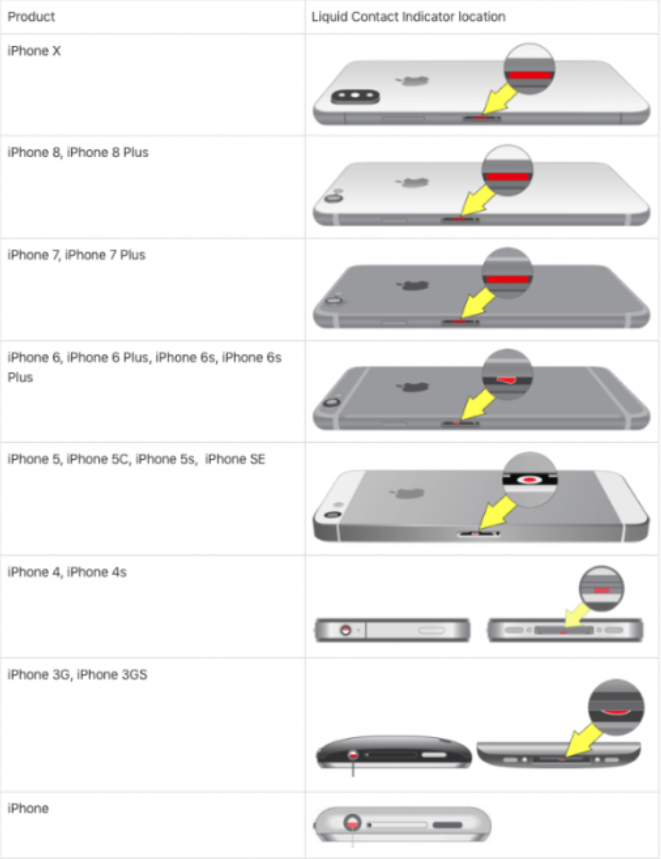
iPhone water damage indicator.
When an iPhone is brought in for inspection after a suspected water incident, Apple technicians don’t have to play detective for long. They rely on a clever built-in feature—the Liquid Contact Indicator (LCI)—to tell the story.
This indicator is strategically located, usually near the SIM card slot or another major port. Under normal conditions, the LCI appears white or silver. However, exposure to water or other liquids will cause this little tab to turn a bold red. This color change is clear evidence that liquid has entered the device.
To check the LCI yourself, simply eject the SIM tray and shine a flashlight into the slot. If the indicator is red, it means your iPhone has encountered liquid, and unfortunately, this is enough proof for Apple technicians to confirm liquid damage. As a result, warranty coverage does not apply in these cases.
The LCI provides a straightforward answer, removing any mystery around whether a device has been exposed to moisture. If the indicator is white or silver, your iPhone is likely safe; if it’s red, liquid damage has been officially detected.
However, if your device is damaged within the warranty period, you can always take the phone to Apple and see if they will replace or repair it for free. Though chances are fairly slim, you may be eligible for iPhone water damage repair free of cost given Apple’s new relaxed water damage policy for iPods, which probably includes the iPhone.
The newly relaxed water damage policy states that if a customer disputes whether an iPod with an activated LCI has been damaged by liquid contact and there are no external signs of corrosion damage, the iPod may still be eligible for warranty service.
Nevertheless, if you have extended coverage of AppleCare+, Apple will replace the device at a reasonable cost in case you dropped iPhone in water or any liquid accidentally and get water damaged. This will use up one of your two incidents of accidental damage. However, if any of the above does not cover you, and in rare cases, if none of the above steps works for you, you have no other alternative but to go to any mobile service shop for iPhone water damage repair.
Repair and Replacement Options
If your iPhone has suffered water damage, there are several repair and replacement options to consider. For those with AppleCare+, Apple offers a straightforward replacement service for a deductible fee, making it easier and more affordable to get your device back in working order. If you don’t have AppleCare+, you can still bring your iPhone to an Apple Store or an authorized repair provider for an assessment. These professionals can evaluate the extent of the water damage and provide a quote for repairs. In cases where the damage is severe, replacing the device may be more cost-effective than attempting extensive repairs. Always choose a repair provider authorized by Apple to ensure your iPhone is handled by experts who use genuine parts and follow proper procedures. This not only helps maintain your device’s quality but also protects any remaining warranty or guarantees you may have.
When selecting a service provider, look for those who are thorough and efficient—experienced technicians should never cut corners or take unnecessary risks with your device. Reputable repair centers will carefully verify that every function is restored, and many even offer workmanship guarantees on both parts and labor. Most common iPhone water damage repairs can often be completed the same day, minimizing your downtime and getting you reconnected quickly.
Specialized Equipment and Advanced Techniques
Some authorized repair centers now utilize advanced equipment such as multi-slot polishing machines (like the Refox 16-Slot Polishing Machine, used for iPhone 12 and later models). These specialized tools allow technicians to precisely clean, restore, and polish components affected by water exposure—especially the screen and logic board—potentially saving devices that would otherwise be deemed beyond repair. With the right technology and expertise, even significant water damage doesn’t always mean the end for your iPhone.
Whether you’re facing a minor mishap or a more serious submersion, choosing a service provider with the right tools and experience is crucial for the best possible outcome.
Whether you opt for repairs or a replacement, acting quickly can make a significant difference in saving your iPhone from permanent water damage.
Getting a Professional Assessment
If your device was submerged for an extended period or the water resistance failed, seeking a professional inspection is essential. You can reach out to Apple Support online, visit an Apple Store, or go to an Apple-authorized service center to get a thorough evaluation. Keep in mind, attempting to dispute obvious water damage with store staff is rarely successful—Apple technicians check the Liquid Contact Indicator (LCI), usually found near the SIM tray, which turns from white or silver to red when exposed to liquid. This indicator is a clear sign of liquid contact and is commonly used to determine warranty eligibility.
Even if you’re hoping to have repairs covered under warranty, it’s important to know that the LCI is a decisive factor for technicians. If the indicator is red, it’s nearly impossible to argue your case—even if you believe the device shouldn’t have been affected by water. For your own reference, you can check the LCI yourself by removing the SIM tray and shining a light inside; a white or silver indicator means no liquid has been detected, while a red one confirms water exposure.
Ultimately, if the LCI shows red, warranty coverage for liquid damage is unlikely, and you’ll need to consider out-of-warranty repair or replacement options.
What to Expect During a Professional Inspection
When you bring your iPhone in for inspection, technicians will assess the extent of the damage. They’ll often begin by checking the LCI and looking for any signs of corrosion or residue inside the device—especially around ports, buttons, and the SIM tray.
Another telltale sign of water exposure is corrosion in the charging port, SIM card tray, or side buttons. While a bit of residue or early corrosion might indicate a recent spill, the presence of rust or heavy corrosion points to prolonged moisture exposure. Technicians will pay close attention to these areas, as spotting rusty parts helps them judge how long the device has been affected and whether certain components need extra care or outright replacement.
By carefully inspecting these critical zones, professionals can better determine the best path forward—whether it’s a simple cleaning, targeted repairs, or more extensive component replacement.
If the device was in water for only a few seconds and shows no signs of internal moisture, a simple cleaning may be sufficient. However, if water has seeped into internal components or if the phone was submerged for a long time, a more thorough evaluation and potential component replacement may be necessary.
What Happens During the Inspection?
Experienced repair professionals work diligently to verify that each part of your iPhone is functioning as it should, without cutting corners or overlooking hidden issues. They may detach the screen assembly to inspect and, if needed, replace a water-damaged display. Diagnostics are then run to determine if other components—such as the speakers (which can become muffled or stop working), the battery (often attracting moisture due to being the warmest part), the system board (housing sensitive electronics like the processor and RAM), or the camera assembly (where moisture can sometimes sneak behind the lens)—have been compromised.
Most common repairs, including screen or battery replacements, can often be completed the same day, depending on the severity of the damage and part availability. Reputable service providers will back their work with guarantees on parts and labor, ensuring your device is returned to you in the best possible condition.
Taking these steps not only helps restore your iPhone’s functionality, but also gives you peace of mind knowing that all potential damage has been properly addressed.
What Technicians Look For
During the inspection, a skilled technician may carefully disassemble your iPhone using specialized tools and best practices to minimize further risk. They’ll look not only at obvious points of entry but also at the most vulnerable internal components. For example, the screen assembly is often removed to check for underlying moisture or damage, and, if necessary, replaced. Other parts frequently affected by water include:
Speakers: Water can muffle or render them non-functional.
Battery: As one of the warmest components, it tends to attract moisture, which can reduce its lifespan or performance.
System Board: The central hub housing sensitive electronics like the processor and RAM is particularly susceptible to corrosion.
Camera Assembly: Sometimes, moisture sneaks behind the lens, impacting photo quality.
After addressing any immediate issues, technicians will typically run a full diagnostic to ensure all components are functioning as they should. Reputable repair providers work efficiently but thoroughly, double-checking their work before returning your device. Many common repairs can even be completed within the same day, but the turnaround depends on the extent of the damage.
Turnaround Time for Water Damage Repairs
Repair times for water-damaged iPhones can vary depending on the extent of the damage and the service provider’s workload. In many cases, authorized repair centers—like the Apple Store or certified independent shops—can complete common repairs or initial diagnostics within the same day, especially if only minor cleaning or component replacement is necessary. However, if the iPhone has sustained more extensive water damage that requires deeper assessment or ordering specific parts, the process may take several days.
Most reputable repair services will keep you updated throughout the process and offer a warranty on their work and any parts replaced. If speed is a priority, be sure to ask about expected turnaround times when you drop off your device so you know exactly what to expect.
Understanding Warranty Limitations
Even if you believe your device should be covered due to water resistance claims, liquid damage is generally excluded from standard warranties. Unless your coverage specifically mentions accidental damage (like AppleCare+ does), repairs will likely come at a cost. There have been cases internationally where regulatory bodies have challenged misleading water resistance advertising, but as a general rule, be prepared to pay for any repairs related to water exposure.
Most devices come with a standard one-year manufacturer’s warranty, but this typically does not include water damage. Some brands, such as Apple, offer the option to purchase an extended protection plan like AppleCare+ within the first few weeks of ownership. This upgraded coverage often does include accidental liquid damage, though it usually comes with a deductible fee if you need a replacement or repair.
It’s also important to note that device manufacturers often include hidden moisture indicators inside their phones. These indicators change colour when exposed to water, allowing service technicians to quickly determine if your device has been compromised. If the indicator reveals liquid damage and you only have the base warranty, you’ll likely face a much higher repair or replacement cost.
In summary: unless you’ve opted for an enhanced protection plan that specifically covers accidental water damage, you should anticipate out-of-pocket expenses if your device takes a dive.
Tips Before You Head In
- Do not power on your device if it was submerged for an extended period—this can prevent further damage.
- Remove any cases and accessories and gently dry the exterior with a soft towel.
- Eject the SIM tray and keep it out to allow better airflow and evaporation.
- Don’t use rice to dry your phone—instead, if possible, use silica gel packets in an airtight container to help absorb lingering moisture before seeking service.
Staying calm and acting quickly can improve your chances of recovery and may even save you money in repair costs.
When to Consider Replacement Over Repair
Sometimes, the cost of repairing a water-damaged iPhone—especially when corrosion has set in or multiple components are affected—can approach or even exceed the price of a replacement. Authorized service providers will advise you if this is the case, helping you make an informed financial decision.
No matter the route you take, responding swiftly and relying on authorized professionals will maximize your chances of restoring your iPhone’s functionality and safeguarding your investment.
Additional resources for other Apple Devices
If you’ve experienced water-related mishaps with your other Apple gadgets, you’re not alone—and helpful information is just a click away. For guidance on rescuing soaked AirPods, there are dedicated guides outlining the best steps to dry them safely and minimize lasting damage. Apple Watch owners can find step-by-step recommendations for post-swim care, tips for expelling water from the speaker, and maintenance reminders following accidental immersion.
For those curious about warranty coverage or repair status for any Apple device—whether it’s your iPhone, iPad, Mac, or accessories—Apple’s support portal offers convenient warranty checks. Major technology sites and forums like MacRumors, Reddit’s r/apple, and iFixit also feature troubleshooting tips and best practices shared by real users and experts alike. Taking advantage of these resources before and after water exposure can make all the difference in keeping your entire Apple ecosystem working smoothly.
Preventing Future Damage
Protecting your iPhone from future water damage starts with a few simple habits. Always handle your device with care, keeping it away from water, liquids, and environments where moisture or dust can accumulate. If you accidentally drop your iPhone in water, act immediately—turn off the device, remove any accessories, and dry the exterior thoroughly. Investing in a waterproof case or pouch can provide an extra layer of defense against water ingress, especially if you’re often near water or in dusty environments. Regularly clean your iPhone’s ports and openings to prevent dust and debris from building up, which can make it easier for water to enter the device. By taking these proactive steps, you can help ensure your iPhone remains dry, functional, and protected from accidental drops, spills, and exposure to liquids.
Even though many modern iPhones are water-resistant, it’s best to treat your device as if it isn’t. Take special care when using your phone near pools, beaches, bathtubs, or any place where a splash or quick dip could occur. If your lifestyle frequently puts your device at risk—say, you’re often by the water, out in the rain, or working in humid environments—consider investing in a reputable waterproof case for daily use. Additionally, researching insurance options that cover liquid damage can offer peace of mind in case the unexpected happens.
By combining caution, the right accessories, and a little foresight, you can minimize your risk and keep your iPhone safe from water damage for the long run.
Frequently asked questions
Now that I have explained in detail how to get water out of your iPhone and dry it out in case you dropped iPhone in water or dropped iPhone in toilet or any kind of liquid by accident, let me also address some of the related questions often asked by iPhone users.
What to do if my iPhone falls in water?
Here’s what to do if you drop your iPhone in water:
1. Take the phone out of the water immediately and turn it off;
2. Remove phone cases or covers, if any;
3. Take out the SIM card, Tray, and Battery;
4. Use a clean dry absorbent cloth to wipe off as much of the exterior water as you can from your iPhone;
If your device doesn’t use an e-SIM, be sure to remove the SIM card tray as well—even though modern trays may have a watertight seal, it’s not always foolproof. Liquids can still seep in, so taking out the tray gives moisture one less place to hide and helps protect both your phone and SIM card from potential damage. Pay extra attention to the charging port, headphone jack, and any other openings while drying, as these are common entry points for water.
5. Wipe out ports with a toothpick and a piece of cloth;
6. With all the visible water on iPhone removed dry out your device as dry as possible in a warm, dry location;
7. Silica gel being an incredibly moisture-absorbent substance put your iPhone in an air-tight plastic bag surrounded by a bunch of Silica gel packets, at least for 24 hours, to draw out the moisture;
8. Wait for at least 72 hours after you dropped your iPhone in water or the toilet before charging and turning it on;
Should You Try to Repair Internal Components at Home?
It might be tempting to open your iPhone and try to clean the inside yourself, but this is not recommended. Wiping the exterior is helpful, but opening the device can void your warranty, risk further damage, and introduce more issues—especially if you use non-industry-grade cleaning agents. For anything beyond gentle surface drying, it’s best to consult a professional technician or take your device to an authorized service center.
How to get water out of iPhone speakers?
Here’s how to get water out of your iPhone speaker using sound frequency:
1. With an App:
i. Download ‘Sonic app‘ from the App Store;
ii. After the download put your iPhone on a flat surface and open the app;
iii. Swipe up and down the app to set a frequency between 100-200 Hz;
iv. Tap on the ‘Play’ button;
v. Drops of water will start coming out of the speaker grills;
vi. Take a clean cloth and wipe the speaker grill;
vii. Repeat the process until you see no more water coming out of the speaker.
2. With Siri Shortcuts:
i. Install the ‘Shortcuts‘ app on your iPhone from the App Store;
ii. After the app is downloaded install the shortcut called Water Eject;
iii. Run it from the Shortcuts app;
iv. It would play a sound that will not be audible to you;
v. The sound frequency will force the water out of the speaker grill instantly;
3. Using a Website:
i. Go to the Website – fixmyspeakers.com
ii. Tap the big button on the web page to initiate a sound sequence;
iii. Water will start spitting out the speaker grills;
iv. Tap the button again to stop the sound, once the water stops spitting out;
How to fix water damaged iPhone screen?
Water may have gotten into the display screen of the device when your iPhone dropped in water accidentally. To fix water damaged iPhone screen follow the steps below:
1. Half-fill a bowl with uncooked rice;
2. Place your iPhone in the bowl with the display screen facing down;
3. Cover the phone with enough uncooked rice;
4. Leave the phone covered with rice overnight;
5. The rice will draw the moisture out of your phone’s display screen;
How long should I leave my phone in rice?
Leave a wet phone in uncooked rice for 24 hours. The dry, uncooked rice acts as an absorbent material and 24 hours is enough time for the rice to absorb the water in the iPhone.
Can I Repair My Water-Damaged iPhone at Home?
While there are some basic steps you can take at home to mitigate water damage, trying to perform actual repairs—such as opening the device or cleaning internal components—is not advisable. These actions can often lead to bigger issues, including voided warranties and irreparable damage. If your phone does not power on or still shows signs of malfunction after following the drying steps, seek help from a professional repair service.
Conclusion
After reading the post, you must have by now got the answer to your query—what to do if my iPhone falls in water by accident. There is no reason for unnecessary panic after you dropped iPhone in water or toilet or any liquid accidentally from your hand. If followed properly, the steps suggested in the post on how to get water out of your iPhone have been found to fix iPhone water damage in almost all cases.
However, as already mentioned, you should take the phone out of the water as quickly as possible otherwise, the probability of its recovery will diminish significantly if you allow your iPhone to submerge in water while turned on for a considerable period after your iPhone dropped in water (for 15 minutes or longer)
It’s important to note that water damage isn’t always immediately obvious. Even if your device seems to work fine right after you fish it out, moisture can slowly seep into internal components, causing problems that might only appear days, weeks, or even months later. The longer your phone stays submerged, the greater the risk that water will reach sensitive contact points inside, increasing the chances of lasting damage. That’s why acting quickly—and following proper drying steps—gives your iPhone the best shot at a full recovery.
There will be much better retrieval chances if your iPhone fell in water fresh and salt-free than you would with more corrosive salt water. Soft drinks and sticky beverages are more challenging as they leave more residues around.
It’s worth noting, though, that your iPhone’s water resistance isn’t a permanent superpower. Over time, regular use and daily wear can weaken its defenses. Exposing your device to salty seawater or frequent splashes of corrosive liquids like juices or sodas can speed up this process, making it even harder for your phone to survive another dunk.
Also, any screen or battery repair—especially if done by non-certified technicians—may further reduce or completely remove the water resistance. So, if your iPhone has been repaired, take extra care to avoid future spills and splashes.
If you have other important tips to fix your iPhone with water damage, please share your ideas in the comments section below to help other readers.

AlexMorgan
Sep 07. 2015
Good tutorial, but only cover the physical recovery and protection. If you need to recover data from your iPhone after water damaged, there is a more specific tutorial about data recovery may help you out(goo.gl/cMf12E).
radharenu ganguly
Sep 08. 2015
Hi Alex,
Thanks for your useful comment.
Sheryl
Dec 21. 2015
I have an amazing IPhone 5s. It was dropped in a tub by my granddaughter and I just didn’t use it for a day and then I used it a little bit at a time and it never gave me a problem and the screen is crack (thanks to me) then she dropped it in water again and it was submerged for a bit longer then last time and it didn’t fare well at first. Tried same steps as before and on second day it was so frustrating and seri had a mind of her own but I could still call but had to power completely off to get out of some apps. Third day it’s almost completely back to normal. All that’s wrong is I have a little hardly noticeable line at the bottom of screen but all apps and options are working again. Love my IPhone cracks and all
Grant
Sep 06. 2016
Wow, great article. I had a water damage problem not too long ago with my iPhone 5 and I tried the rice in a bag method. Sadly, I failed. I ended up bringing it in to a repair shop nearby and by then it was too late. Will be referring my people to this article when they have water damage issues.
Cheers!
Joan M Girdler
Aug 17. 2021
Is there a possibility of electrocution?