Steps to Setup Built-in VPNs on Android.
How to get free Internet VPN for Android?
Android users often ask, “How can I securely access the Internet free with VPN ?” In this article, I am going to show how to get free Internet VPN for Android with unlimited data, allowing users to access the Internet securely and privately.
Why use a VPN?
VPN allows the users to access the Internet keeping their personal identity and Internet Protocol address (IP address) unknown to the Internet service providers or anyone else.
These days you can get free Internet on mobile everywhere like, at airports, hotels, or restaurants. But while these public WiFi systems are a great convenience, there are also risks of unsecured Public WiFi. Public WiFi may be seen as an open invitation to hackers to watch around and view your online activities. Of course, that doesn’t mean you shouldn’t use free public WiFi when it’s available. This is where the service of VPN comes in. Your identity is protected on the web when you use the Internet free with VPN which ensures privacy of your online activities.
To use free public WiFi, you must use a VPN service that lets you access the Internet safely and privately. VPNs are among the best security tools a web surfer can have. Before I go to show how to get free Internet VPNs for Android using a third-party app and via its built-in VPN that gives free data, let us first see what a VPN is and how it works.
What is a VPN?
Virtual Private Networks (VPNs) play a crucial role in ensuring secure and private internet access, especially on public Wi-Fi networks. The VPN app encrypts all your internet traffic, offers advanced security settings, and provides access to server network, ensuring maximum privacy. It needs to be clarified that VPNs don’t provide an internet connection but it can enhance your online experience by eliminating data caps and ensuring anonymity.
It is a service that lets you access the Internet safely and privately by routing your connection through a server, which helps to protect your identity and IP address to stay anonymous on the Internet and thus securing your online activities. It creates a secure, encrypted connection so that no one else, including the hackers, can see what you’re doing.
Users should weigh the benefits and drawbacks of using free VPNs and understand that paid premium plans may offer more advanced features of security and better performance. Some free VPNs don’t offer strong encryption, which can make it all too easy for a hacker to intercept your connection. When selecting a free VPN, users should consider factors such as privacy policies, data limits, server locations, and security features to ensure a safe browsing online experience.
How Does a VPN Work?
The users of VPN free Internet service first connect to the public Internet through an ISP and then initiate a VPN connection with their VPN server by using the VPN client software. This software encrypts the user’s data, even before his Internet Service Provider could see it. The data then goes to the VPN and from the VPN server to the online destination. The online destination sees the user’s data as coming from the VPN server and not from his computer and his IP address. The service of VPN free Internet service benefits you in several ways, some of which are:
- It is a free service;
- It protects your privacy by strong encryption of all your data;
- It enables you to shield your location from your Internet service provider;
- It provides access to remote resources;
You may also like to read this post: What is a VPN Concentrator and how does it work
Why Are Unlimited Free Internet VPN Providers So Rare?
While the idea of unlimited free VPN service sounds appealing, it’s important to understand why such options are few and far between. Operating a VPN involves significant costs. Providers must maintain servers across multiple locations, handle data transfers, invest in infrastructure, and ensure robust security protocols—all of which require ongoing resources.
Since free VPN users aren’t paying for these services, providers often need to impose restrictions to balance their operational costs. Common limitations include:
- Capped data usage per day or month
- Reduced internet speeds
- Limited server locations or features
- No access to streaming or file-sharing platforms
These restrictions aren’t arbitrary; instead, they encourage users to upgrade to paid plans, where bandwidth and features are much less restricted. For instance, top-tier providers like NordVPN or ExpressVPN offer truly unlimited access—but only as part of their subscription services.
In practice, an “unlimited” free VPN is difficult to sustain. If you do find one advertising unlimited data at no cost, proceed with caution—such services might compromise on privacy or inject ads to recover costs. Carefully reviewing the privacy policies and terms of service is always advised before committing to any VPN, free or paid.
Is It Realistic to Find a Reliable Unlimited Free VPN?
With all the buzz around free VPNs, you may be wondering if it’s truly possible to get unlimited data, robust privacy, and strong security—without ever pulling out your wallet. While that sounds like the holy grail of Internet access, the reality is a bit more nuanced.
Some reputable VPN providers, such as Proton VPN and Hide.me, offer free versions with unlimited data. Yet, even these services often come with certain trade-offs, such as limited server locations or reduced speeds. Most importantly, while established free VPNs might respect your privacy better than no-name alternatives, their security features may be scaled back compared to their premium plans.
If your top priorities are data privacy, reliable performance, and strong encryption, a paid VPN service is generally the safer bet. Premium VPN providers often offer risk-free trials or money-back guarantees—sometimes for 30 to 45 days. This allows you to experience the full range of features without long-term commitment. Essentially, you can cycle through these trial periods, access top-tier unlimited VPN protection for an extended time, then request a refund if you’re not satisfied.
In summary, while unlimited free VPNs do exist, they usually come with limitations or compromises. For ongoing peace of mind regarding privacy and security, consider testing out a premium VPN’s trial or refund window—it’s a practical way to enjoy full protection, at least for a few months, before making a final decision.
When Should You Consider Upgrading to a Paid VPN Plan?
Given these limitations, at what point does it make sense to move from a free unlimited VPN to a paid subscription? While free VPNs like Proton VPN and Hide.me are fantastic for basic web browsing or enhancing privacy on public Wi-Fi, they’re not always up to the task for more demanding needs.
Consider switching to a paid VPN if you:
Need reliable access to streaming services. Free VPNs almost always block streaming platforms, so you won’t be able to watch geo-restricted content from services like Netflix, Hulu, or BBC iPlayer.
Want to torrent or share files securely. Most free plans restrict peer-to-peer (P2P) file sharing entirely. If downloading or sharing is important to you, only paid services enable this feature.
Own multiple devices. Free versions typically limit you to a single device connection at a time, which can be frustrating if you need VPN protection on your phone, tablet, and laptop simultaneously.
Require faster, more consistent speeds. With a limited pool of servers and heavy usage from other free users, you may find speeds sluggish—particularly during peak hours. Paid plans prioritize speed and offer more server options worldwide.
Seek a broader choice of locations. Free plans usually offer just a handful of countries, which can limit your ability to mask your location or access region-specific sites.
Need advanced privacy features. Multi-hop connections, dedicated IP addresses, and specialty servers are generally locked behind a premium plan.
Ultimately, if your VPN usage goes beyond casual browsing—especially if you’re looking for streaming, torrenting, or flexible device support—it’s worth exploring premium options like NordVPN, ExpressVPN, or Proton VPN Plus. Even better, most paid providers offer money-back guarantees, so you can test drive the full feature set with confidence and decide if the upgrade is right for you.
How to Request a Refund from a VPN Provider
Let’s say you’ve taken advantage of a VPN provider’s risk-free trial or money-back guarantee. The process for requesting a refund is usually quite straightforward, but there are a few key steps to ensure everything goes smoothly:
- Sign Up and Use the Service
First, subscribe to your chosen VPN (such as NordVPN, ExpressVPN, or Proton VPN) and use the app as you normally would. Fully test its performance, server locations, and features during the guarantee period—typically 30 or 45 days. - Decide Within the Refund Window
If you find the service isn’t meeting your expectations—whether due to speed, server selection, usability, or anything else—make the decision before the trial window closes. Most providers strictly enforce these deadlines. - Contact Customer Support
Reach out to the VPN’s support team via live chat or email. Clearly request a refund and provide any necessary account details. There’s no need to fabricate reasons; most reputable services honor their guarantees without hassle, provided requests are reasonable. - Await Confirmation
Once you’ve made your request, support will typically confirm your refund and let you know how long the process will take. Most refunds are processed within a few business days, though it can vary depending on your payment method.
Keep in mind, these guarantees are meant for genuine trial purposes—not perpetual free use. Attempting to “game the system” by repeatedly signing up and requesting refunds may result in denial.
By following the provider’s instructions and terms, you can explore premium VPN features risk-free—and get your money back if it’s not the right fit for you.
How to get free Internet VPN for Android
To get a free Internet VPN for Android and to share Internet data remotely there are two ways to create a connection. To use free Internet with VPN on Android you can install a third-party app that provides remote access through a VPN server or connect to a VPN service provider via the built-in Android VPN system.
How to get secured free Internet VPNs for Android using a third-party VPN app
There are many third-party VPN apps to get free Internet VPNs for Android. Rather than confusing you with all of them, when looking for secure access to free Internet with VPN for Android, Feat VPN, and Droid VPN are the two most popular free online VPNs for free internet.
Here are a few requirements that need to be in place when it comes to gaining secure Internet free with VPN by using the above free online VPNs for Android:
i. You must have an active data plan with no balance remaining (If you have any data balance, this will be depleted when you implement this method and connect to the Internet);
ii. Although this method will work for all versions of Android, it is recommended that you have version 4 or higher installed;
iii. The method works for all Android mobile, devices or tablets;
iv. Rooted Android 4.0 or higher OS version device;
Steps to Setup Feat VPN for Secure Free Internet:
Here are the steps to follow to get secure VPN free internet service for Android using Feat VPN:
1. Feat VPN uses a configuration file to set up each server connection. Here we will be using VyprVPN servers. Download and save the configuration files for connecting to the VyprVPN servers you want to connect;
2. Go to www.featvpn.com from your device, download Feat VPN, and install the app;
3. Launch the application, tap Setup, and then Run. The app will run a series of tests to determine if your device is compatible with FEAT VPN;
4. If all tests are completed successfully, tap Exit to continue;
5. Tap Tunnels, and then ‘Add’ to add a VPN connection;
6. Under Configuration, select Load and browse to the location of the configuration files you saved in Step 1.
7. Choose the configuration file for the server you wish to configure;
8. Tap the back button. The server for the configuration file you selected will be listed as a VPN tunnel;
9. Tap the VPN tunnel you just created to connect, and the display will show that a connection is being attempted;
10. You will be prompted to enter credentials;
11. Enter your credentials and tap OK;
In a few seconds, the VPN status should display as connected to the Internet. Now you will gain tunnel VPN free Internet service.
Steps to Setup Droid VPN for Secure Free Internet
Droid VPN is another popular free Internet VPN for Android that can be used for accessing the Internet securely without a data plan. For secure access to Internet free with VPN this app can be downloaded from the Google Play Store.
The steps to follow for the setup are,
1. Download the latest version of Droid VPN from the Play Store and install it on your Android device;
2. Register your account using your Username, Password & Email Address;
3. Next go to Connection Settings, click on ‘Connection Protocol’ and select the TCP option;
4. Now ‘HTTP Headers’ should appear. Click ‘HTTP Headers’ and then tap the check box to enable HTTP Headers;
5. In the Custom HTTP Headers type “Host: get.wynk.in/X-Online-Host: get.wynk.in/” and click OK;
6. Open the DroidVPN app and select any available connection;
7. Click on ‘Connect’ and you will be connected to DroidVPN;
You are now connected to the Internet and can share free Internet data for Android remotely without any mobile data balance.
Note: One final point to note is that for all the steps mentioned above to get a free net VPN for Android without a data plan, there could be slight variations in actual implementation depending on the make and model of your device.
How to get secured free Internet by VPN for Android using its built-in VPNs
Usually, the secured free Internet by VPN can be on Android devices with the help of third-party apps. However, almost all Android devices, especially those with Android version 4.0 and above, have built-in support systems for different kinds of VPNs. One of the easiest ways to get safe access to free public WiFi systems and free Internet VPN for Android is by using its built-in VPN client.
Now, you might be wondering how to get a free data VPN for Android. For this, first, you need to know the free VPN settings for Android mobile to get free VPN Internet service without the help of any third-party app.
Steps to Setup Built-in VPNs on Android
Android has integrated support for PPTP and L2TP VPNs. You can connect to these built-in VPNs without installing any third-party apps and get a free unlimited data VPN.
But the point is – how to get secured free Android Internet using this built-in feature. For this first, you are to set up a VPN from Android settings. Find below a step-by-step guide for getting free Internet using VPN settings. The given method of VPN settings for Android to get a free VPN for free internet without any data restriction is straightforward and very easy to use.
How to set up a free unlimited internet VPN for Android:
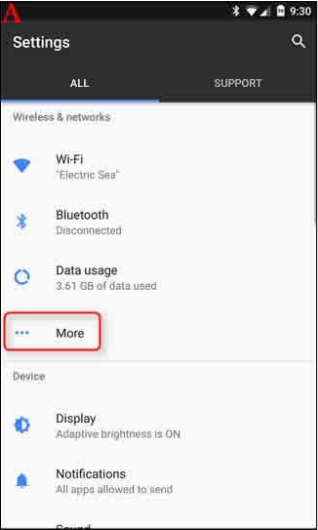
Step 1. Go to Settings and tap “More” under Wireless & Networks as shown in the screenshots below;
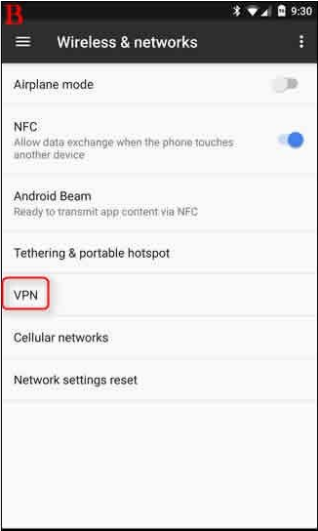
Step 2. Tap the ‘VPN’ option on the Wireless & Networks screen that appears;
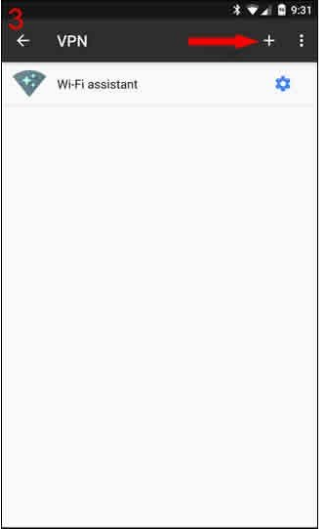
Step 3. On the top-right corner of the blank screen that appears, you will find a + sign or “add VPN profile” (depending on your version of Android). Tap it;
Step 4. Your network administrator will provide you with all your VPN information. Simply select your desired protocol and enter all the information.
[In the VPN Name field you are to enter a name of your choice like My VPN etc. Under the field ‘Type’, choose PPTP. In the Server address you can enter your preferred server location (here is the full list of locations) and finally check the PPP Encryption (MPPE) box];
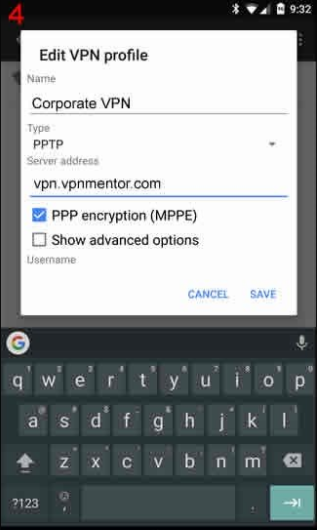
Step 5. Once completed, click ‘Save’ and the VPN will appear. Tap on it, enter the username and password in it, and click on ‘Connect’;
Step 6. In your notification bar, you will now see a running VPN service without any third-party app on your Android device. Instantly you will have your Internet identity encrypted;
The free Internet with VPN service will now allow you to access a free public WiFi system securely and to share free Internet data for Android remotely through public networks.
5 Best VPNs for free Internet access
To save you the hassle of searching for the best VPN with unlimited data, I have given below a list of 5 top-class both paid and free VPNs for Android with unlimited data for free Internet access. Top paid premium VPNs need payment upfront but come with 30-day money-back guarantee, letting you test all their features and get a refund if you’re not satisfied.
Though the trial is relatively brief for the paid VPNs, you get to enjoy all the benefits of a premium service.
1. Surfshark VPN – Unlimited data VPN with great speed (with free trial);
2. NordVPN – Feature-filled VPN without data limits (with free trial);
3. Atlas VPN- User-friendly VPN without data cap (7-day free trial);
4. ExpressVPN – Secured VPN, fastest speed and unlimited data (30-day free trial);
5. Proton VPN – Best free VPN network for Android. It offers unlimited data, high speeds, and a strict no-logs policy;
Some VPNs providing premium services offer free versions to secure Android smartphones. Proton VPN is the best free VPN network that has proven to provide maximal security on Android. This undisputed best free VPN network for Android offers a free tier without monthly data caps and unlimited speeds making it the top choice for costless online protection.
What features does ExpressVPN offer during its free trial period?
ExpressVPN’s free trial period (activated via its 30-day money-back guarantee) unlocks the full premium experience without holding anything back. That means you’ll have access to its massive global server network spanning 105 countries, allowing you to connect virtually anywhere for fast and secure browsing.
During the trial, you can:
- Stream content seamlessly—including bypassing geo-blocks on services like Netflix, so you can catch your favorite shows no matter where you are.
- Enjoy robust speeds, thanks to its advanced Lightway Turbo protocol and 10 Gbps servers—ideal for high-quality streaming and lag-free downloads.
- Use P2P (torrenting) freely on all servers with no restrictions.
- Connect up to 14 devices simultaneously, making it suitable for sharing across family members or multiple devices.
- Benefit from strong privacy measures, including a strict no-logs policy that has been independently audited over twenty times.
- Protect your data with advanced security tools: an automatic kill switch, leak protection, ad blocker, and even parental controls to restrict inappropriate content.
- Get started easily, as the app is straightforward to install and works across all major platforms, offering even a short free trial directly on iOS and Android.
In summary, ExpressVPN’s trial gives you the ability to explore every premium feature—speed, streaming, security, privacy, and flexibility—entirely risk-free for 30 days before making a long-term commitment.
Why Use NordVPN’s Money-Back Guarantee?
If you’re considering premium VPN features but hesitant to commit, using NordVPN’s money-back guarantee is a smart move. For 30 days, you can take NordVPN for a test drive—no risks, no strings attached. This lets you experience its full suite of benefits without worrying about losing your investment if it doesn’t suit your needs.
Here’s what you stand to gain:
- Unlimited data and bandwidth: Secure your browsing and stream as much as you want with zero restrictions on speed or usage, perfect for heavy users or binge-watchers.
- Massive server network: With thousands of servers spread across hundreds of global locations, you enjoy greater flexibility in choosing your virtual location for privacy, security, and easy access to global content.
- Advanced security features: Take advantage of state-of-the-art encryption, a robust kill switch, and innovative tools like double VPN servers and threat defense that can block malicious content before it reaches your device.
- Strict no-logs policy: Multiple third-party audits back up NordVPN’s claim to protect your privacy and ensure your activity remains confidential.
- Bypass tough censorship: Features like obfuscated servers help you access content even in regions with restrictive internet policies.
- No long-term commitment required: If you decide it isn’t the right fit, simply request a refund within 30 days—no questions asked.
In essence, trying out NordVPN with its risk-free option means you get all the perks of a premium service—top-notch privacy, security, and blazing speeds—for a month, putting your mind at ease before making any long-term commitment.
Which VPNs Offer Independently Audited Privacy?
For those who put privacy first, choosing a VPN that backs up its claims with independent audits is non-negotiable. Two standout services meet this gold standard: Proton VPN and Hide.me. Both have undergone rigorous third-party evaluations to confirm that they hold true to their strict no-logs policies—meaning your online activity remains confidential and isn’t stored or shared.
- Proton VPN: Operates from Switzerland for added legal privacy protections, and its no-logs claims have passed comprehensive external audits. Security features include robust encryption, leak protection, and performance optimizations.
- Hide.me: This service also provides unlimited use with strong privacy credentials, including multiple independent audits attesting to its no-logs pledge. Hide.me employs modern protocols and advanced leak protection, ensuring only you have access to your browsing data.
Choosing a VPN with a proven, independently verified commitment to user privacy ensures your digital footprint is kept truly private, without relying solely on a provider’s word.
Best Free Unlimited VPN for PC Platforms
When it comes to finding the best free unlimited VPN for your PC, there are a few noteworthy options to consider—each offering robust security, reliable speeds, and user-friendly experiences.
Top Recommendations:
- Proton VPN: Easily the standout choice for truly unlimited free use on Windows and Mac. Proton VPN’s free plan doesn’t impose data caps, maintains a strict no-logs policy, and is grounded by Switzerland’s strong privacy laws. Speeds are respectable, and the interface is refreshingly simple to use, making it an excellent pick for both beginners and seasoned users.
- Windscribe: Another solid option, Windscribe provides a generous monthly data allowance, strong encryption, and plenty of server locations. While their free tier does have a data limit, upgrading unlocks unlimited usage.
- TunnelBear: Known for its approachable design and ease of setup, TunnelBear is a favorite among those just starting with VPNs. The free version offers a limited amount of data each month—but it’s an easy way to test-drive the platform before considering a paid plan.
- Other Notables: ExpressVPN and NordVPN both offer risk-free trials, which let you sample all premium features—including unlimited data and world-class speeds—for a set trial period. While not permanently free, you do get to experience premium-level protection with a money-back guarantee if you’re not fully satisfied.
For anyone seeking a cost-free, unlimited VPN on PC, Proton VPN remains the top option due to its no-cost, no-data-cap approach and unwavering commitment to user privacy. The alternatives are well worth considering if you need more server locations or want to try out intuitive interfaces.
Which VPNs offer unlimited free data without logging user activity?
If you’re searching for a VPN that won’t cap your data or keep tabs on your online footprint, there are a couple of standout choices to consider. The best contenders in this space are those that combine unlimited bandwidth with a strict no-logs policy, ensuring both privacy and uninterrupted browsing.
Top VPNs with Unlimited Free Data & No Logging:
Proton VPN: Based in Switzerland and operating under robust privacy laws, Proton VPN is widely recognized for its truly unlimited free plan. It allows you to browse, stream, and download as much as you like—all without collecting or storing records of your activity. No credit card is needed to get started, and the app interface is refreshingly simple.
Hide.me: Another reputable option, Hide.me offers a free plan with unlimited data on select servers, coupled with a clear no-logs commitment. It’s a great option for those who want hassle-free privacy, fast connections, and basic VPN coverage—all for free.
What sets Hide.me apart is its strong focus on privacy and security. You get industry-standard AES-256-bit encryption, IP leak protection, and support for modern protocols like WireGuard, which means your browsing stays private and your connection remains speedy. The provider’s no-logs policy has been independently audited, so you can trust that your activities aren’t being tracked.
Hide.me’s free plan does have some limitations to keep in mind. You’re limited to eight server locations (but you can choose which one to use), and there’s no support for simultaneous connections. Torrenting and streaming are also off the table, as P2P traffic is blocked and streaming sites won’t work reliably. Still, for basic web browsing and light content consumption, Hide.me is a solid choice—especially if you value privacy and unlimited data without the fuss.
Both options let you use their services without the need to provide payment details up front, so you can enjoy anonymous browsing out of the box. If maximizing both security and data freedom is your priority, these VPNs have you covered.
Is There Really a Truly Unlimited Free Internet VPN?
You might wonder: does a genuinely unlimited free internet VPN even exist, or is it just another tech myth like free energy or perpetual motion machines? Let’s clear up the confusion.
Most free VPNs out there come with strings attached—think data caps, speed throttling, or limited server locations. After all, providing secure, reliable VPN services costs money, and companies aren’t in the business of handing out freebies indefinitely. Their usual strategy? Tempt you with just enough access to get you interested, then encourage you to upgrade for the full experience. That means most so-called “free” VPNs restrict bandwidth, slow down your speeds, or block key features like streaming and torrenting.
However, there are a few standout providers that break this mold. Some offer unlimited bandwidth on their free tier, letting you browse, stream, and download without hitting a wall. The trade-off? You may face limitations like fewer available servers, slower peak-time speeds, or the occasional ad. Still, for privacy-focused users or anyone needing reliable access on a budget, these rare free unlimited VPNs are worth a closer look.
In short, while unlimited free VPNs are uncommon, they’re not entirely unicorns—just be mindful of what “unlimited” really means and always consider your security and privacy above all.
Pros and Cons of Using an Unlimited Free VPN
Before you jump on the bandwagon and rely solely on an unlimited free VPN for your online escapades, it’s wise to know exactly what you’re getting into. While having access to free, unlimited VPN data can feel like you’ve struck digital gold, there are several trade-offs to consider. Here’s what you should keep in mind:
Advantages
- No Data Limits: The most obvious benefit—browse, stream, and download without worrying about hitting a data cap. Services like Proton VPN stand out here, offering unrestricted bandwidth at no cost.
- Enhanced Security: Leading free VPNs use strong encryption protocols (think 256-bit encryption), reliable kill switches, and leak protection to keep your online activity safe from prying eyes.
- Privacy Without a Price Tag: Some reputable providers enforce a rigorous no-logs policy, meaning your browsing habits aren’t tracked, stored, or sold.
- Completely Free: No hidden fees or unexpected charges—just sign up and connect.
Drawbacks
- Limited Streaming and Torrenting: Free unlimited VPNs often restrict access to popular streaming sites like Netflix or block torrenting altogether. Those features are usually exclusive to paid plans. Even when you find a service advertising unlimited data, streaming attempts may falter due to geo-blocks, and P2P support is frequently disabled.
- Device Restrictions: Unlike paid VPNs that let you secure multiple devices at once, free versions commonly limit you to a single connection. If you’re hoping to protect your laptop, phone, and tablet at the same time, you’ll need to upgrade.
- Slower Speeds: With free VPNs, you may notice a dip in speed, especially during peak times. Overcrowded servers can lead to sluggish performance. While some free services boast unlimited bandwidth, real-world usage often means slower connections and occasional buffering.
- Potential Data Logging: Not all free VPNs are created equal—some may store logs and sell user data to third parties as a way to fund their service.
- Smaller Server Choice: You’ll typically get access to a limited number of servers, which can make it difficult to unblock content from certain regions or maintain reliable connections.
Weigh these pros and cons carefully before settling on a free unlimited VPN—it’s all about balancing your need for speed, privacy, and functionality.
Proton VPN Free: The Ups and Downs
Let’s talk specifics. If you’re considering Proton VPN’s free plan, what exactly do you gain—and what do you sacrifice?
What’s Great
- Unlimited Data: Unlike most free VPNs that slap on a data cap faster than you can finish a Netflix episode, Proton VPN lets you browse, stream, and download without restriction. Unlimited bandwidth truly means unlimited here.
- Reliable Security: With tough 256-bit encryption, robust DNS leak protection, and support for advanced protocols like WireGuard, Proton VPN stands out for keeping your digital life locked down.
- Solid Privacy: The no-logs policy means your online activity and personal details aren’t tracked or sold, which is a breath of fresh air if privacy is top of mind.
- Simple, User-Friendly Apps: Proton VPN’s apps are easy to install and even easier to use, making setup a breeze—no manual server juggling required.
Where It Falls Short
- Streaming and Torrenting Restrictions: Hoping to binge that international show or download via P2P? The free version blocks torrenting completely, and streaming support is hit-or-miss since it can’t break through many geo-blocks.
- Single Device Limit: You’re confined to just one connection at a time, making it less ideal for households with lots of gadgets.
- Limited Server Access: While you do get access to multiple global locations, you can’t pick your exact server, and the choices are fewer than on paid plans.
- Basic Feature Set: Don’t expect bells and whistles—advanced tools found in premium subscriptions, like malware blockers or advanced obfuscation, are absent here.
In short, Proton VPN’s free tier is all about strong fundamentals—security, privacy, and unlimited browsing—without the frills. Perfect for private, everyday surfing, but less so for power users chasing streaming or file sharing across multiple devices.
The Pitfalls of Mobile-Only VPN Services
As tempting as it is to grab a free, unlimited VPN straight from your app store, mobile-only VPNs often come with a baggage claim’s worth of headaches. While they promise unlimited data and airtight security, reality doesn’t always match the sales pitch.
Here’s what you need to watch out for:
- Privacy Concerns: Many mobile-only VPNs fund their “free” offerings by collecting your browsing habits and personal data—think tracking what you do online and even selling that info to advertisers. If privacy is your main goal, this is a major red flag.
- Ad Overload: These services frequently litter your browsing experience with ads. All those pop-ups aren’t just annoying—they’re a sign the VPN is paying its bills through advertising rather than quality service.
- Lackluster Performance: Despite promising fast, unlimited access, mobile-only VPNs often fall short. It’s common to see sluggish speeds, dropped connections, and strict limits on streaming, torrenting, and gaming.
- Functionality Limits: These VPNs might block or restrict streaming platforms and file-sharing sites, making them impractical for anything beyond basic browsing.
- Limited Cross-Platform Support: Though the name suggests “mobile-only,” these apps can show up on both Android and iOS platforms. Unfortunately, support rarely extends beyond your phone or tablet, so you’re out of luck if you want protection for your laptop or other devices.
- Questionable Security: While there are some exceptions, many mobile-only VPNs offer minimal transparency about their security practices or business operations. Some may lack essentials like solid encryption or reliable kill switches.
In a nutshell, while mobile-only VPNs sound convenient, the compromise on privacy, performance, and true security is rarely worth what you “save” in dollars. Make sure to read the fine print and opt for reputable providers—especially if your data and peace of mind are top priorities.
Which is the best VPN for free browsing?
Proton VPN is the best free Internet VPN for free browsing. This is a VPN unlimited free Internet for Android without any data restrictions, with strong security, good connection speed and a strict no-logs policy. Proton VPN provides unlimited bandwidth. The best thing about Proton VPN is that it is completely free. For the fastest possible speeds, choose the server location closest to you.
You may also like to read: My Internet keeps disconnecting every few minutes – proven fixes
How to disconnect from a VPN
You can also disconnect from the VPN whenever you want. While connected to a VPN, you will see a persistent “VPN activated” notification in your notifications drawer. If you want to disconnect from the VPN service, simply tap the notification and then tap ‘Disconnect’.
Considerations for Choosing a Free Internet VPN
Here are some additional points to consider for a more comprehensive understanding of free Internet VPN services and to make informed decisions about their online privacy and security:
1. Considerations for Choosing a Free VPN: Free VPNs have limitations, such as slower speeds and fewer server locations than paid premium plans. Factors to consider while choosing a free Internet VPN service are, data limits, server locations, logging policies, and speed limits. It is also important to select a reputable VPN provider to ensure privacy and security;
What security and privacy features should you look for in a free unlimited VPN?
When selecting a free unlimited VPN, security and privacy should be your top priorities. Not all VPNs are created equal—so here’s what to look for to make sure your data stays safe and your browsing remains truly private:
- Strong encryption: Look for VPNs that offer at least 256-bit encryption. This is the industry standard and ensures your online activity is shielded from prying eyes, whether you’re on public WiFi or your home network.
- No-logs policy: A reputable VPN should never track, store, or sell your browsing data. Check that the provider has a clear and strict no-logs policy—preferably one that’s been verified through independent security audits.
- Leak protection: Quality VPNs offer DNS and IP leak protection, making sure your real location and identity aren’t accidentally exposed while browsing or streaming.
- Modern VPN protocols: Seek out VPNs supporting secure and efficient protocols like WireGuard or OpenVPN. These protocols balance strong security with solid connection speeds.
- Kill switch: A kill switch is a must-have safeguard—it instantly cuts your internet connection if the VPN drops, so your information is never accidentally leaked.
- Third-party audits: Credible VPNs often undergo independent third-party audits to validate their security claims. This offers added assurance that they take your privacy seriously.
- Bypass censorship: If accessing restricted content is important to you, choose a VPN with obfuscated or stealth servers that can work around internet censorship and firewalls.
By considering these features, you can confidently choose a free VPN that not only gives you unlimited browsing but also keeps both your data and identity secure while online.
2. Risks of Using Free VPNs: Potential risks associated with using free VPN services are, data privacy concerns, exposure to malware or adware, slower speeds, and limitations on features or functionality. Therefore, research and vet VPN providers thoroughly before using their services;
Which free Internet VPN services should you avoid, and why?
While the promise of unlimited free internet with VPNs is appealing, not every option out there is worth your trust—or your data. It’s crucial to be cautious, as some free VPNs come with significant drawbacks that can compromise your privacy and security.
Here’s what to watch out for when choosing a free VPN service to avoid:
Data logging and privacy concerns: Some well-known free VPNs monitor your activity, collect logs—including browsing history and IP addresses—and may share or even sell this information to third parties. This defeats one of the main reasons to use a VPN in the first place: maintaining your privacy online.
Resource sharing risks: Certain VPNs operate on a peer-to-peer (P2P) model, which means your internet connection—or even your IP address—might be used by other users. This setup can expose you to legal trouble if someone else uses your shared resources for illicit activities.
Potential exposure to malware or ads: Many free VPNs generate revenue through intrusive ads or by bundling unwanted software with their apps. This increases your risk of malware infections or annoying interruptions.
Lack of real server infrastructure: Instead of dedicated, secure servers, some free VPNs just use the devices of their users to power the network. This setup is less transparent, harder to audit, and not as reliable or safe as you’d want for your online security.
Partnerships with data brokers: Free VPNs may have less-than-transparent connections with proxy providers or data companies, further heightening your risk of data misuse.
In summary, always be vigilant when evaluating free VPN options—especially those that promise unlimited bandwidth with few strings attached. Steer clear of services that lack a transparent privacy policy, don’t clearly state their logging practices, or rely on peer-to-peer models to function. Your privacy and security are too important to gamble with a questionable service.
3. Include a disclaimer: While VPNs can enhance online privacy and security, they are not foolproof solutions and may not provide full threat protection. Therefore, users should stay informed about emerging cybersecurity risks and use VPN services responsibly.
Alternatives to Relying Solely on Free VPNs
While free VPNs like Proton VPN stand out for providing unlimited data and solid protection, they’re not the only route if you’re seeking secure, unrestricted online access. If you’re concerned about the potential limitations or security trade-offs with free VPNs, here are some alternatives worth considering:
Take Advantage of Premium VPN Free Trials and Refund Periods: Many top-tier VPN providers offer you a taste of their full-featured premium service through free trials or money-back guarantees—usually ranging from 30 to 45 days. You can sign up, test all their capabilities without restrictions, and request a refund if it doesn’t meet your needs. By carefully timing these trials, you can experience several months’ worth of unlimited, high-speed, and secure VPN service at no actual cost.
Rotate Between Different Trial Offers: You aren’t limited to a single provider’s trial or refund window. By alternating between reputable brands, you can extend your period of secure, unlimited browsing substantially before needing to commit to a paid plan.
Look Out for Temporary Promotions: Occasionally, major VPN vendors launch extended trial periods during promotional events or as part of partnerships. Staying alert for these deals can allow you to enjoy premium service well beyond the standard free month.
This strategy provides you with a safer, feature-rich browsing experience compared to the usual free VPN options, minus the long-term risks or limitations. Just remember to mark those refund dates in your calendar!
Frequently asked questions
Before I conclude let me also reply to some of the quarries related to the services of free VPN Internet, often made by mobile phone users.
How to get unlimited Internet for free?
Using free WiFi networks and hotspots is one great way to get unlimited Internet for free. All you need to do is look for public areas such as hospitals, universities, restaurants, hotels, and even Airports to get free WiFi. But be careful when using free WiFi. Hackers usually use it to steal users’ credentials. That is why it is always recommended to use a good VPN when using free WiFi.
Are there any limitations or drawbacks to using free VPNs for accessing the Internet on Android?
Yes, free VPNs often come with limitations such as data caps, slower connection speeds, and fewer server locations compared to paid VPN services. The free version allows users to access only 8 out of 91 server locations, which is not enough to unblock geo-restricted content. Additionally, some free VPNs may display ads or require users to upgrade to a premium service plan for full access to features.
But what does this look like in practice? Most free VPNs restrict you to a single device, cap your speeds well below what’s available to paid users, and block torrenting or streaming altogether. For example, while some free VPNs—like Hide.me—don’t enforce a data cap, you’re still limited in server selection and can’t always access popular services like Netflix or Disney+ from abroad. On the other hand, paid services such as NordVPN, ExpressVPN, and CyberGhost remove these barriers, offering unlimited data, access to thousands of servers in over 100 countries, and support for streaming and P2P activities with speeds that can rival your unprotected connection.
Performance and Security Differences
Speed is often the most noticeable distinction. Premium VPNs use high-capacity servers and proprietary protocols (such as NordLynx or Lightway Turbo) that routinely deliver speeds exceeding 300 Mbps—compared to free tiers that frequently halve your connection and struggle with congestion. Security-wise, paid options consistently provide advanced features like AES-256 encryption, WireGuard support, IP leak protection, and verified no-log policies—sometimes confirmed by third-party audits. Free services, while still encrypting your traffic, may lack these assurances and occasionally log user data for advertising purposes.
Can I get free Internet with a VPN?
You cannot get free Internet access with a VPN. VPN enhances your online security and privacy. VPN only encrypts your network and helps you stay secure over the web. VPN only allows users to access free WiFi networks keeping their personal identity and location unknown to the Internet service providers or anyone else.
Are there any legal concerns or risks associated with using free VPNs for accessing the Internet on Android?
While using VPNs itself is legal in most countries, the legality of accessing certain content or bypassing censorship using VPNs may vary depending on local laws. Additionally, users should be cautious of potential security risks and privacy concerns associated with some free VPN providers.
Is free Internet VPN safe to use?
Using a free Internet VPN may not be the safest option as many free VPN providers sell user data, which goes against the very purpose of using a VPN to protect your online privacy. You should expect slower speeds with free VPNs compared to paid services. Upgrading to a paid account provides access to advanced security features, larger server networks, and faster speeds.
You may also like to read this post: How to get WiFi without Internet Provider – 7 available options
Conclusion
Now that you know how to set up a free Internet VPN for Android, one important point needs to be mentioned here.
Just like most free services, using a free VPN with unlimited data may not always provide the best level of desired security. Completely free VPNs may have limitations like data caps, small server networks, and slow speeds. Paid premium VPNs, on the other hand, offer advanced security features. larger server fleets, and fast speeds. Premium VPNs offer a 7-day free trial plus a 30-day money-back guarantee, so you can test all premium features risk-free.
An easy way to boost your chances of having a secured free VPN for an Android phone that lives up to your expectations is, to pay for one. Besides the free VPN for free internet options, a variety of software providers offer standalone paid apps for Internet free with VPN.

Farhd
Oct 28. 2018
I read the whole thing and it doesn’t say how to get free internet. It only shows how to activate VPN on your phone. How can I get VPN inormation from my network administrator? And by network administration you mean my phone carrier?
radharenu ganguly
Nov 01. 2018
Hi Farhd,
Simply select your desired protocol and enter all the information. (In the VPN Name field you are to enter a name of your choice like My VPN etc. Under the field ‘Type’, choose PPTP. In Server address you can enter your preferred location. You can find the full list of locations here: https://www.privateinternetaccess.com/pages/network and finally check the PPP Encryption (MPPE) box);
For free internet I have given the process at end of the article.
To locate your Device administrator,
1. Open the Settings app on your Android device, and scroll all the way down to Security and tap on it;
2. Look for an option named ‘Device administrators’ or ‘All device administrators’, and tap it once;
3. You should now be seeing all the administrators listed with their name, as well as a short description of what those administrators do;
4. If you see check marks next to the names that would mean those are the administrators that have been enabled;
U
Dec 24. 2020
What do i enter as the username and password in the vpn which is not for any app?
radharenu ganguly
Dec 27. 2020
Hi U
You can Register your account using Username, Password & Email Address of your choice.
Dan
Jan 07. 2021
Hello… I am in Africa… West Africa…. Can the same settings of droid vpn work here as well. Thanks
radharenu ganguly
Jan 10. 2021
Hi Dan,
Try to connect on Droid VPN free server and DroidVPN will find the best settings for your internet service provider in your country.
You can also send Droid VPN an email at – support [at] droidvpn.com for the settings in your country
Name (required)
Sep 14. 2020
Hi bro ,
I Read your page but I understand , so please do you know some app get Free internet Mobilphone I don’t have PC , I hope to help me and thank you .
radharenu ganguly
Sep 16. 2020
Hi,
Gigato is the best-known app that will provide you with FREE internet data on your mobile phone
Dhuruvan
Nov 27. 2020
Hi
Can I use gigato in Android tablet
If yes, where can I download the app
Please send the link
radharenu ganguly
Nov 28. 2020
Hi Dhuruvan,
You can use Gigato which provides free unrestricted Internet data for your Android. Here is the link:
https://downloadapk.net/down_Goji-Goji.html
Allan
Jul 05. 2021
Full list of locations, but when I clicked there I found an app asking me to pay something, do I need this app also?
My own vpn has failed to connect
Sep 03. 2021
My own vpn has failed to connect
James
Jan 19. 2019
I don’t understand cloud you do a video on how to get free internet it is confusing and I had read it over 10 times
Henry
Feb 01. 2019
Please how do I get to know my server address
radharenu ganguly
Feb 04. 2019
Hi Henry
Sorry for the delay in replying. Please read the following to understand how you can find your server address:
A name server translates domain names into IP addresses. This makes it possible for a user to access a website by typing in the domain name instead of the website’s actual IP address. For example, when you type in “www.microsoft.com,” the request gets sent to Microsoft’s name server which returns the IP address of the Microsoft website.
Each domain name must have at least two name servers listed when the domain is registered. These name servers are commonly named ns1.servername.com and ns2.servername.com, where “servername” is the name of the server. The first server listed is the primary server, while the second is used as a backup server if the first server is not responding.
Name servers are a fundamental part of the Domain Name System (DNS). They allow websites to use domain names instead of IP addresses, which would be much harder to remember. In order to find out what a certain domain name’s name servers are, you can use a WHOIS lookup tool.
Kian
Feb 05. 2019
You explained everything in a short and understandable way for every person who has never heard anything about vpns before, thank you for that! It is not an easy task to decide in which provider to invest, but I guess it depends on your needs. I bought Nordvpn provider because the price with this discount code nordvpn.org/3yoffer was pretty amazing.
radharenu ganguly
Feb 06. 2019
Hi Kian,
Thanks for stopping by and your comments.
zack
Mar 29. 2019
after configuration, my droid vpn app keeps on stopping
Jacqueline
Dec 07. 2019
Well, I’ve read the article of my choice. How to get free internet using VPN built in to my android. Very clear & understandable by me, a no tech user! Now to follow the instructions & find out if it works! Will get back to you on that.
radharenu ganguly
Dec 08. 2019
Hi Jacqueline
Thanks for your comments.I would be glad if the article can help you.
Eddy
May 01. 2020
Is it a must for my location to be on the link and for me to have a little data on my phone
Claudius Tormu
Aug 24. 2021
Hi I use the HTTP header provided by you on Droidvpn (“Host:get.wynk.in/X-Online-Host:get.wynk.in/”) but they are saying invalid HTTP header. Can you please help me out?
How come I don't the username and password
Feb 12. 2020
How come I dont know the password and username
Jacqueline
Dec 07. 2019
Article has concise instructions. Will apply & get back to you with results.
simon henry
Feb 26. 2020
The VPN market is full of amazing options but so far FastestVPN is proved to be the best and the fastest Android VPN. Security features are also commendable and the price is also very affordable. In fact, FastestVPN pricing gives it a solid advantage over its other competitors. No one could ever expect great security features Like DNS protection and 256-bit encryption at such a low price. FastestVPN is really a comprehensive and best VPN for android.
Silla
Nov 26. 2020
What do you mean price? I thought we were talking about free internet here.
John
Aug 03. 2020
I have done all orders but finally I am try to connecte but the VPN says unsuccessful what’s behind that?
Freefire
Aug 30. 2020
Thank you for this amazing information. Great knowledge. I was finding this type of read,this time I found perfect post as I finding. Thank you.
You can also check how to getfree internet data in Airtel sim
Tyrese
Sep 21. 2020
Do we need a specific username and password after we’re done r it doesn’t matter what we use?
radharenu ganguly
Sep 21. 2020
Hi Tyrese,
You can register with password of your choice.
Emmanuel
Sep 27. 2020
I love it
Can a Nigeria use the Gigato App.
Jan 19. 2021
Can a Nigeria use the Gigato App??
radharenu ganguly
Jan 19. 2021
Hi,
Gigato is a subsidiary of US-based Mavin Co. The company’s official website says that it supports ‘Net Neutrality’ and believes in ‘unrestricted data for unrestricted Internet’ for all users.
Send me vpn app name. Help me guys
Oct 29. 2021
Send me vpn app name. Help me guys
radharenu ganguly
Oct 29. 2021
Hi,
My top three suggested standalone VPN for free Internet service are, ExpressVPN, TunnelBear and NordVPN. If you’re looking for a clear winner in the VPN industry, ExpressVPN just might be that. With ExpressVPN, you can be rest assured that any information you share via your Android device, is completely safe and secure.
Pinks
Feb 09. 2021
Which vpn can we use access free internet in zimbabwe
radharenu ganguly
Feb 09. 2021
Hi Pinks,
My top three suggested standalone VPN for free Internet service are, ExpressVPN, TunnelBear and NordVPN. If you’re looking for a clear winner in the VPN industry, ExpressVPN just might be that. With ExpressVPN, you can be rest assured that any information you share via your Android device, is completely safe and secure.
Fox
Mar 12. 2021
Hey,how can I access free unlimited internet in Botswana
radharenu ganguly
Mar 13. 2021
Hi Fox,
You can go to the following website and follow the steps to access free internet on orange Botswana:
https://bit.ly/3vhIECC
which free VPN can we use in Uganda
Jul 25. 2021
which VPN can u use in Uganda
radharenu ganguly
Jul 26. 2021
Hi,
CyberGhost is the most user-friendly VPN for Uganda with easy-to-use apps for various platforms including Windows, iOS, Android, Mac, and Linux.
Cali
Mar 16. 2021
Please help me at every one who has now how to get free internet
Danny James
Mar 17. 2021
Help me how to set up the free internet access
Patrick
Apr 02. 2021
Hello,
What are your thoughts about the VPN app Adara Virtual 5G for Android? I’ve been using it and seems to work great but not sure if the internet is free. Can you get free internet by using this app?
Na
Oct 13. 2021
If u want help u can visit our website
Kenjudah
May 08. 2021
Pls mine couldn’t open tcp main socket, what is the cause and what do I do
radharenu ganguly
May 08. 2021
Hi Kenjudah,
It usually happens when your internet connection is not strong enough to hold the connection. DroidVPN connection requires a strong signal. So before you connect to DroidVPN try to search for places that have better internet connection.
Kaka
Jun 02. 2022
Hello Dear Admin,
Thanks for all this ! I have tried alot to use these vpns but its not working in Afghanistan please interduce a vpn with full settings for me a fast and unlimited vpn that can work in Afghanistan.
Thanks in advance
radharenu ganguly
Jun 02. 2022
Hi Kaka,
HideMyAss is the best VPN for Afghanistan IP addresses, but if you want a relatively low-cost alternative, PureVPN also has Afghan servers. Though neither VPN is very highly rated according to me, but they’ll still help you get an Afghan IP address.
HideMyAss — Massive network of servers and a user-friendly interface;
PureVPN — A pocket-friendly VPN for Afghanistan;
Ntege
Jun 15. 2021
Can I get free internet using phisphon pro vpn
radharenu ganguly
Jun 15. 2021
Hi Ntege,
Yes, you can configure and use Psiphon app or VPN to get free internet access.
Zaitun
Jul 05. 2021
Hello,
I downloaded a driod VPN but whenever I try to connect..it brings server is full.what
Should I do different?
david
Jul 13. 2021
The startup offered customers free access to SMS, mobile network, fixed and wireless internet, with a limit set on the volume of basic services. Freedom Pop for Free Internet. NetZero for Free Internet. Wi-Fi Free Spot for Free Internet.
free-data-for-android4If is possible you can not get your own free internet .If you have landline its still possible free dial-up ISP like that NetZero.
Eddy
Sep 28. 2022
Hi, I’ve followed all instructions above but still it shows me that unsuccessful, why? What user name can i use or Location can I put there? Thanks!
Enoch
Sep 04. 2021
How will I find the username and password
radharenu ganguly
Sep 04. 2021
Hi Enoch
You can enter username and password of your choice.
Praiib
Sep 06. 2021
Hi how can I download feat VPN , I tried to get it on http://www.featvpn.com but it’s not available
Kbrown
Nov 11. 2021
Which VPN can I use in Nigeria
radharenu ganguly
Nov 11. 2021
Hi Kbrown,
ExpressVPN is the best VPN for Nigeria. It’s the fastest VPN which offers users excellent privacy and security.
Adonis
Sep 24. 2021
Hi admin, How to configure psiphon pro vpn?
radharenu ganguly
Sep 24. 2021
Hi Adonis,
You can visit the following link to configure psiphon for free internet
https://www.dreampointech.com/2020/12/configure-and-use-psiphon-to-get-free-internet-access.html
Eddy Cruz
Dec 01. 2021
How to connect Droid VPN
Kekvyn
Dec 06. 2021
Please which VPN can I use in Ghana 🙏
radharenu ganguly
Dec 06. 2021
Hi Kekvyn,
Express VPN is the best VPN for Ghana. It’s compatible with all devices, has excellent privacy and security features. CyberGhost VPN is also a great value VPN for Ghana.
Lubangakene Aaron
Dec 27. 2021
I tried using the “Host:get.wynk.in/X-Online-Host:get.wynk.in/” but telling me invalid http format
radharenu ganguly
Dec 27. 2021
Hi Aoron
Download latest version of Droid VPN from Play store and install on your android device and try again
Barry Sadou
Jan 03. 2022
Hi thank you for this nice work. What vpn can i use in Burkina Faso for getting free internet?
Alexandr
Jan 24. 2022
Hi admin! Can you suggest options for getting free internet in Kazakhstan on beeline.kz and activ.kz? I would be very grateful for help.
radharenu ganguly
Jan 24. 2022
Hi Alexander,
You can have BEELINE KAZAKHSTAN FREE INTERNET VIA ANONYTUN VPN with proper settings
Abraham Bol
Feb 01. 2022
I tried all the procedures but mine failed to connect🤷
James
Feb 11. 2022
The listed ways to get free Internet are good. However, there are other ways you can get free unlimited internet access without spending a single dime.
The procedures involve VPN tunneling apps and other tools that can easily bypass your ISP firewall to get you free internet. Mind you, your network SIM card and country don’t matter as this works for everyone.
https://www.techfoe.com/2022/02/10-best-ways-to-get-free-Internet-2022.html
Chidera
Feb 23. 2022
Please can I use this Free internet to download stuff online like videos.
Emma hill
Mar 21. 2022
VPN is awesome please try it I’m sure you will love it as much as me
Jim
Mar 24. 2022
Hello admin
am using mtn uganda, my droid vpn just blinks once when i tap on start and that’s all, i can’t connect anymore, i reinstalled older versiom too but all in vain, how should i fix it pls?
radharenu ganguly
Mar 27. 2022
Hi Jim,
It usually happens when your internet connection is not strong enough to hold the connection. You need to have as stronger internet because DroidVpn connection requires a strong signal.
Mike
Jul 09. 2022
Can I get free internet with IPvanish VPN?
radharenu ganguly
Jul 09. 2022
Hi Mike,
The only way to get IPVanish VPN for free is to take advantage of its 30-day money-back guarantee. You can trial IPVanish on all your devices for up to 30 days. While you’ll be temporarily charged on signup, you can cancel your subscription before the refund period ends.
Blueweb
Sep 28. 2022
Admin am interested with your hard work, but can you create ha tunnel Free internet fo Tanzania on AIRTEL network, of you can please do so and help us i
radharenu ganguly
Sep 29. 2022
Hi Bluewb,
Follow the procedures shown below to configure your VPN tunnel app and enjoy free Internet:
1. Download HA Tunnel Plus(https://play.google.com/store/apps/details?id=com.hatunnel.plus&hl=en_US&gl=US) and then install;
2. Download your Airtel network configuration file(https://download-techmilitant.blogspot.com/2022/02/latest-2022-airtel-ha-tunnel-plus-vpn.html);
3. Open the app and click on the three dots by the top right side of the screen;
4. Click on “Import/Export” and then “Import Config”;
5. Now locate the configurations you downloaded earlier and click to import;
6. Now click on Start and then wait for the connection to go through. When it does, minimize and enjoy free net access;
In case you encounter any issue, disconnect and reconnect.
Mukisa
Apr 12. 2022
Good
AllyK
Apr 18. 2022
Hi. radharenu ganguly
How to get free internet access in Tanzania?
radharenu ganguly
Apr 18. 2022
Hi AllyK,
Please go to the following link showing how to use free internet by the Droid VPN app in Tanzania –
https://allglobalupdates.com/how-to-get-free-internet-in-tanzania/
Onyango silver
Apr 28. 2022
Thank you
Lucas Henry
May 25. 2022
Thank you for this informative article, its really help me and my friends to get free internet on our android phones.
radharenu ganguly
May 25. 2022
Hi Henry,
Thanks for your comments. I am glad that the article helped you.
Mudassar Ali
Jun 15. 2022
I used to be able to find good information from your articles.
Chek it out!
How to use free Internet
Chris Mensah
Jun 18. 2022
Which VPN can u use in Ghana please?
radharenu ganguly
Jun 18. 2022
Hi Chris, here’re the top five best VPNs for Ghana:
NordVPN, ExpressVPN, CyberGhost, IPVanish and
PrivateVPN
Kulwa
Sep 27. 2022
Hi dear admin which vpn can get free internet in Tanzania by use app?
radharenu ganguly
Sep 29. 2022
Hi Kulwa,
The Tanzanian government has been known to block some VPNs.Tanzania internet users would do quite well to subscribe to NordVPN. The provider’s comprehensive online security and privacy protections keep your online travels undercover, while its large global server network provides fast connections to geo-blocked content around the world. Comes with a risk-free 30-day money-back guarantee.
yussuf
Oct 10. 2022
which vp is best for free internet in tanzania
radharenu ganguly
Oct 10. 2022
Hi Yussuf,
The Tanzanian government has been known to block some VPNs.Tanzania internet users would do quite well to subscribe to NordVPN. The provider’s comprehensive online security and privacy protections keep your online travels undercover, while its large global server network provides fast connections to geo-blocked content around the world. It Comes with a risk-free 30-day money-back guarantee.
Katlego Motaneko
Oct 12. 2022
I need help with free net in botswana
Zazi..M416
Jan 05. 2023
Hey Man
Which VPN free internet now in Tanzania.
Government change some rules..
radharenu ganguly
Jan 05. 2023
Hi Zazi,
The Tanzanian government has been known to have blocked some VPNs.Tanzania internet users would do quite well to subscribe to NordVPN. Its comprehensive online security and privacy protections keep your online travels undercover, while its large global server network provides fast connections to geo-blocked content around the world. It Comes with a risk-free 30-day money-back guarantee.